
NetBOM: The Origin Story
During the holiday break between Christmas and New Year’s Eve 2021, I finally found the time to tackle a long-neglected project: securing the IoT network in my home. This network supports devices like cameras, smart light bulbs, and thermostats. While it’s separated from my other networks, I had wanted to go further—restricting each device’s communication to only the specific servers it requires.
By default, networked devices can see and communicate with every other device on the same network, as well as any server on the internet. I had experimented with network isolation settings before, but they quickly caused issues, so I shelved the project. Now, my goal was straightforward: research and implement isolation rules for each device.
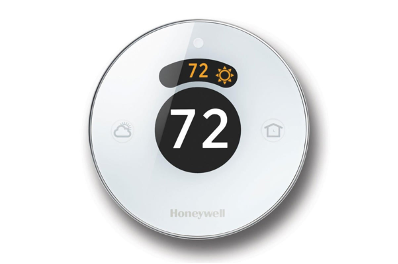
Smart Thermostat
Research
I started with the thermostats—two Honeywell Round Smart models. My first step was searching for technical information. The official 28-page “Professional Installation Guide” offered plenty of details about wiring, mounting, and connecting to Wi-Fi, but nothing about the ports, protocols, or IP addresses needed for network communication. More online searches turned up little from the manufacturer. Eventually, I stumbled across a Reddit post where someone had contacted Honeywell’s tech support and shared the relevant ports, protocols, and IP addresses. Success! But why did it take so much effort to find this?
Given that the Reddit post was two years old, I decided to confirm the details by contacting Honeywell directly. Using their web chat tool, I joined a queue and waited around 20 minutes. When my turn finally came, the experience was underwhelming. The representative, Gerard, was polite but slow to respond and ultimately unable to provide the information I needed. I asked repeatedly for ports and IP addresses, only to be told that such details weren’t available through basic support channels. Eventually, after more prodding, Gerard shared that only standard HTTP/HTTPS ports were required. He also provided three domain names for the thermostat’s cloud servers: tccprod01.Honeywell.com, tccprod02.Honeywell.com, and tccprod03.Honeywell.com. While it wasn’t much, it was a start.
Next, I used nslookup to find the IP addresses associated with these domain names:
tccprod01.Honeywell.com -> 199.62.84.151
tccprod02.Honeywell.com -> 199.62.84.152
tccprod03.Honeywell.com -> 199.62.84.153
Examining the Traffic
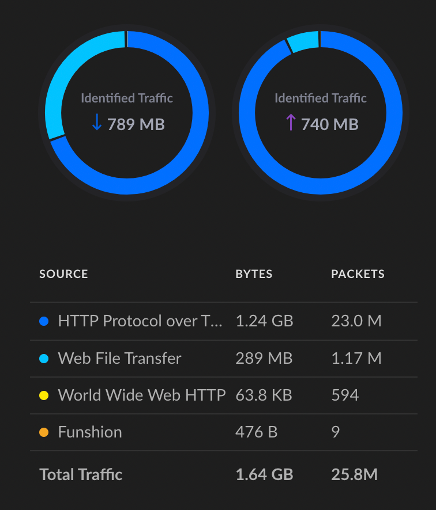
With these IP addresses, I had the basics needed to begin creating firewall rules. However, upon examining the actual network traffic, I encountered some unexpected connections. One thermostat was connecting to a Chinese company, Funshion Lab, which claims to be, “...a high-tech enterprise engaged in the production of smart home products.”
The other thermostat connected to “hotspotshield,” which is a VPN service. These connections raised some serious questions.
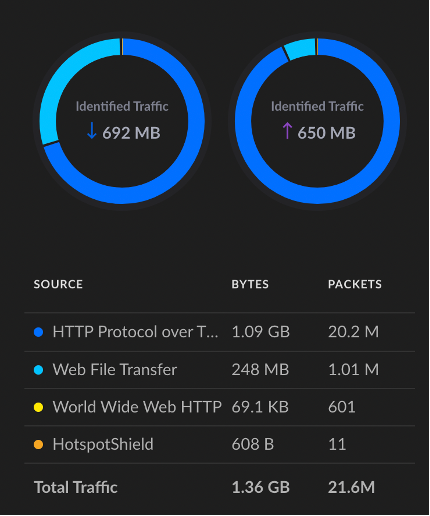
Why were these devices communicating with these domains? If Honeywell was aware, shouldn’t they disclose such information so users can detect potentially suspicious activity?
Conclusion
Ultimately, after several hours of research, I gathered enough information to begin restricting my thermostats’ Internet access. However, the difficulty in obtaining this data highlighted a broader issue: manufacturers should provide these details by default, and security rules should be automated and continuously updated. Thinking about all this, I came up with the concept of a Network Bill of Materials (NetBOM), which is now published in a white paper.